Shootbay — Offline photography studio software. $29 launch offer.
Launch offer Shootbay + Studio Kit $49 once
Photography studio management — without the subscription

Run your photography business.

Not another monthly subscription.

Clients, shoots, post-production, contracts, invoices and expenses in one private workspace that runs on your computer — pay once, and your studio data stays with you.

$49 onceNo subscriptionNo accountMac + PC14-day refund

Pages from The Studio Kit PDF
Also includedThe Studio Kit — free with ShootbayA 29-page PDF with word-for-word client scripts, inquiry replies, follow-ups and wedding-day timelines.

Secure checkout by Gumroad. Your download link appears after payment. Shootbay runs on a computer, so if you buy on your phone, open the download on your Mac or PC.

A

Finance

Income, expenses & tax set-aside estimate

Revenue · YTD
$0
$4.9k this month
Expenses · YTD
$0
$0 this month
Net profit · YTD
$0
97% margin
Tax set-aside (est.)
$0
25% of net · $3.6k deductible
Revenue · 12 months
Monthly revenue
A
S
O
N
D
J
F
M
A
M
J
$4.9k
J
Expenses by category
YTD total
$3,599Total expenses
Gear$2k
Travel$504
Marketing$500
Education$299
Props$120
Software$102
Expenses
Search expenses…All categories ▾Deductible ▾Newest first ▾
DateCategoryDescriptionAmountDeductible
Jun 15MarketingWedding fair booth$350✓ Yes
Jun 11OtherBusiness insurance$95✓ Yes
Jun 6PropsVintage furniture rental$120✓ Yes
Apr 9SoftwareAdobe Creative Cloud$59.99✓ Yes
What you're buying

A real app that runs in your browser — not in the cloud.

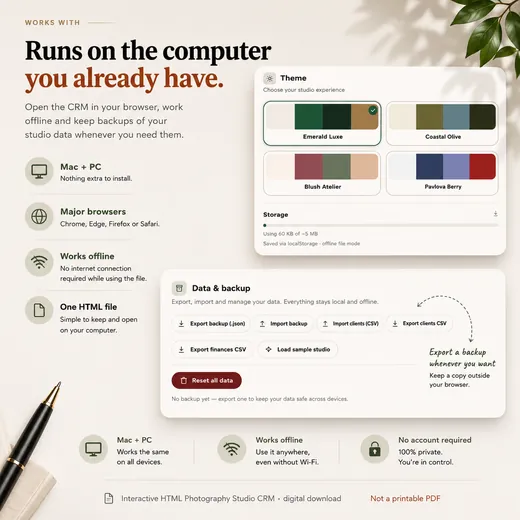
Shootbay is one self-contained file. Double-click it on your Mac or PC and it opens in Chrome, Safari, Edge or Firefox. The browser draws the screens, but your studio data is saved on that computer: there's no Shootbay account, nothing is sent to our servers, and it keeps working with the Wi-Fi off.

Not a spreadsheet template. Not a browser extension. Not another cloud login.

01
Download one file

Shootbay.html, a Start Here guide and your Studio Kit PDF. Nothing to install.

02
Set up your studio

A short welcome screen asks for your studio name and preferences. Bring existing clients in from a CSV if you have one.

03
Work, then back up

Everything saves in this browser as you go. Export a backup file from Settings whenever you like.

One workspace · nine modules

Nine modules. Zero tabs.
One quiet workspace.

Nine modules share the same client records, from first enquiry to delivered photos. Your galleries stay with your gallery service — Shootbay keeps the link and tracks delivery.

01
Clients

Lead to delivered, with balances always visible.

24 active
02
Shoots

Month, week and agenda views for every session.

11 upcoming
03
Workflow

Cull → edit → review → deliver without losing track.

3 overdue
04
Finance

Income, expenses, profit and a tax set-aside estimate.

$37,943 profit
05
Contracts

Draft from your template, sign in person, save as PDF.

Save as PDF
06
Templates

Reusable messages with client details filled in.

{{client}} ready
07
Gear

Track value, insurance and equipment condition.

9 items
08
Goals

Revenue, shoot and client goals with progress.

33% complete
09
Analytics

Plain-English insight into your most profitable work.

Best month
Dashboard···+ Add
Shootbay WorkspaceOffline · All changes saved
$Revenue
$0
33% of goal
◱Shoots
0
of 80 goal
◔Clients
0
11 upcoming
↗Net profit
$0
97% margin
Revenue · last 6 months$4.9k
FebMarAprMayJunJul
Upcoming shoots
Maya & Jonah
Tomorrow · 10:00
Scheduled
Noah Whitman
Aug 3 · 10:00
Confirmed
Elena Brooks
Aug 8 · 10:00
Scheduled
View all →
Your pipeline

Drag a client from
lead to delivered.

A calm drag-and-drop board for every stage of the relationship. Balances, session dates and next steps travel with the card — so the next step stays in view.

Due-balance pills on every card
Complete a shoot → workflow appears
Board or table view, your call
Pipeline PreviewBoardTable···
Lead12+
Liam & Sarah
Wedding · Oct 12, 2026
L&$1,200 due
Ethan & Co
Branding · Nov 3, 2026
E&$4,500 due
+ Add client
Booked8+
Sofia Patel
Portrait · Sep 22, 2026
SP$840 due
+ Add client
Delivered15+
Marcus Family
Family · Aug 15, 2026
MF
+ Add client
Gallery delivered ✓

Finance

This week ▾
Revenue · YTD
$0
33% of $120k goal
Net profit
$0
97% margin
Tax set-aside
$0
25% of profit
Revenue this weekRevenue ▾
$5k$4k$3k$2k$1k$0
+$4,120 · best day
MonTueWedThuFriSatSun
Expenses by category
Gear$1,25028%
Travel$98022%
Marketing$67015%
Software$59013%
Other$1,01022%
Total expenses$4,500
InvoicesView all
Invoice #1024
Maya & Jonah
Paid$1,200
Invoice #1023
Sofia Patel
Unpaid$840
Invoice #1022
Ethan & Co
Paid$4,500
Invoice ready to print or save as PDF
Tax set-aside estimate
$0
25% of profit · your rate
Money, sorted

See profit the
moment it lands.

Revenue, expenses and net profit update as you work. Choose the percentage you want to put aside for tax and Shootbay shows the amount — a planning estimate, not tax advice. Invoices open as a clean page you can print or save as PDF and send yourself.

Tax set-aside estimate at your rate
Printable invoices — save as PDF
Revenue by type, source & month
Export income & expenses as CSV for your accountant
Your data, your copy

Moving computers shouldn't mean losing your studio.

Shootbay saves your studio in the browser's storage on your computer. That keeps it private and offline — and it makes your backup file your safety net. One click puts everything in a single file you can keep anywhere and restore on another computer.

  1. Export a backupSettings → Data → Export backup downloads one file with your clients, shoots, workflows, contracts and finances. Shootbay shows when you last did it.
  2. Keep a copy somewhere elseAn external drive, or your own Dropbox, iCloud Drive or Google Drive folder.
  3. Restore when you need toOn a new computer, open Shootbay and choose Import backup. It replaces the data in that browser with your backup.
Worth knowing: clearing this browser's site data removes your studio, and private/incognito windows don't save it at all. Your latest backup is what you'd restore from, so export one regularly — weekly is a good habit.
How backups work →
Shootbay's Settings screen showing Export backup, Import backup and CSV export buttons
Settings → Data & backup in Shootbay

Your client database isn't sitting on our server.

Shootbay Offline has no account and makes no network requests while you work, so client details, contracts and finances stay on your computer. (This website uses Google Analytics to count visits; the app doesn't.) Read how your data works →

Inside the app

See how Shootbay keeps
your studio together.

From first enquiry to final payment, explore the tools that keep clients, shoots, contracts, finances and everyday studio work organised.

Before you buy

What Shootbay Offline does — and what it doesn't.

Handles today

  • Clients & pipelineLead-to-delivered board or table, balances, custom fields, CSV import and export.
  • ShootsMonth, week and agenda calendar with status for every session.
  • Post-productionCull → edit → review → deliver board. Completing a shoot creates its workflow; the gallery link is stored with it.
  • ContractsWritten from your template with client details filled in, signed on your computer, saved as PDF.
  • InvoicesA printable invoice per client showing what’s paid and what’s due — save it as PDF and send it yourself.
  • Income & expensesProfit, categories, deductible flag, a tax set-aside estimate at your own rate, CSV export.
  • Message templatesMerge fields fill in name, date, deposit and balance, ready to copy into your email.
  • Gear, goals & analyticsEquipment and insured value, yearly targets, best shoot types and months.
  • Backup & restoreOne-file export and import, plus four colour themes.

Needs an online service — not included

  • Sending contracts for clients to sign remotely
  • Taking card or online payments on invoices
  • Sending emails automatically
  • Hosting client galleries or a client portal
  • Syncing between computers or phones
  • Several people working in the same data

You can still do these alongside Shootbay: email the PDF, take payment the way you do now and mark it paid, and keep your galleries where they are. Shootbay Cloud — a separate, optional service for sync and hosted features — is planned, has no release date, and isn't part of this purchase.

How contracts work

  1. Write it in Shootbay. Start from your contract template; the client, date and fee fill in.
  2. Sign in person. The client draws or types their signature on your computer, and Shootbay records it as signed with the date.
  3. Save as PDF. Print or save the signed agreement as a PDF for your records, or to email to your client.

Need a remote signature? Save the contract as a PDF and send it yourself, or use a separate e-signature service. Shootbay Offline doesn't send contracts out for signing and doesn't use any cloud service.

Is Shootbay right for your studio?

A strong fit if you

  • run a solo or small photography business
  • want clients, shoots and money organised in one place
  • are tired of paying monthly for a CRM
  • prefer keeping business data on your own computer
  • mostly work from one computer

Probably not the right fit yet if you need

  • several team members editing at the same time
  • automated email sequences
  • clients signing or paying online through your CRM
  • a hosted client portal
  • the same data live on your laptop and phone
Pricing

One price. Paid once.

Most photography CRMs bill you every month. Shootbay Offline is $49 once — no tiers and no renewal. Click through the read-only demo first if you like.

Live Demo

Click through a sample studio before you buy.
Free
READ-ONLY · NO ACCOUNT
Click through all 9 modules
Sample data, right in your browser
Editing and saving are turned off
No login required
Open the demo
What you buy

Shootbay Offline

The app, plus the Studio Kit PDF.
$49once
ONE-TIME PURCHASE · MAC + PC
9 modules: clients, shoots, workflow, finance, contracts, templates, gear, goals, analytics
Contracts signed in person · printable invoices (save as PDF)
CSV import & export · backup & restore · 4 themes
Updates to Shootbay Offline included
Free bonus included
The Studio Kit
A 29-page PDF: inquiry reply and follow-up sequence, 25 word-for-word client scripts and 2 wedding-day timelines. A4 + US Letter.
Get Shootbay — $49
Secure checkout by Gumroad· Download link after payment· 14-day refund — see policy

Shootbay Cloud

A separate, optional online service we’re planning.
Planned
NOT AVAILABLE YET · NO RELEASE DATE
Cross-device cloud sync
Hosted client pages
Email sending & online payments
Get an email if it launches. Not needed to use Shootbay Offline.

Why isn’t Shootbay a monthly subscription?

Shootbay Offline runs on your computer. We aren’t hosting your client database or running servers for your studio every month, so there’s no ongoing cost to pass on — that’s what makes a one-time price possible. If we launch hosted features later, they’ll be a separate, optional Shootbay Cloud service.

Not sure yet? Try the read-only demo before you buy.
Who's behind Shootbay

Built by Allgood Studio.

Shootbay is an independent product from Allgood Studio, made for photographers who want to run their studio without another monthly software bill.

Questions before buying? hello@shootbay.com — we usually reply within one business day.

Questions before you buy

What photographers
ask first.

Something not covered here? Email us and we'll tell you honestly whether Shootbay fits your studio.

Explore the read-only demo
A sample studio you can click through. No account needed; editing is turned off.

A zip with Shootbay.html (the app), a Start Here guide, a short README and license, and the Studio Kit PDF. Gumroad shows your download link after payment and also emails it to you. Download it on a computer — Shootbay is built for Mac and PC.

It's a web app in a single HTML file, not an installer. Double-click it on a Mac or PC and it opens in Chrome, Safari, Edge or Firefox. It isn't an iPhone or Android app; it's designed for a computer screen.

No. Once the file is on your computer it runs with the Wi-Fi off. You only need a connection to download it, and to open links you add yourself, like a client's gallery.

In the storage of the browser you open Shootbay with, on that computer. There's no Shootbay account and the app doesn't send your data to us or anyone else. Settings shows how much of the browser's storage you're using (about 5 MB is available when Shootbay runs as a local file).

Your studio is as recent as your last backup. Put Shootbay on the new computer, choose Settings → Data → Import backup, and you're back where that backup left off. We never have a copy of your data, so without a backup it can't be recovered.

Settings → Data → Export backup downloads one file containing everything. Import backup replaces the current data with that file, so export first if you're unsure. Clients and finances can also be exported as CSV. Shootbay shows the date of your last backup.

Yes. Export a backup on the old computer, copy Shootbay.html and the backup file across, open Shootbay and choose Import backup. Your license covers your own devices for one studio.

Clearing the browser's site data erases the studio saved there, and private/incognito windows don't save at all. Restore from your latest backup. Each browser keeps its own storage, so opening Shootbay in a different browser starts an empty studio.

Weekly is a sensible habit — and always before clearing browser data or switching computers.

Not through Shootbay. Clients sign on your computer by drawing or typing their name. For a remote signature, save the contract as a PDF and send it yourself, or use a separate e-signature service.

No. Shootbay creates a printable invoice you can save as a PDF and send. Take payment however you do now, then mark the deposit or balance as paid.

No. Message templates fill in the client's details for you to copy into your own email, and the Email button on a client opens your email app.

No. Keep your gallery service; Shootbay stores the gallery link and tracks delivery. It can open a one-page client summary (session, balance, gallery status) that you save as a PDF and send, but nothing is hosted online.

Not at the same time. Data lives in one browser on one computer and there's no sync. Email us about team or multi-studio licences.

Yes, from a CSV file with columns such as name, email, phone and value. You can export clients to CSV too.

No. $49 is a one-time payment with no renewal, and updates to Shootbay Offline are included.

A 29-page PDF in A4 and US Letter: an inquiry reply and four-message follow-up sequence, 25 word-for-word scripts for awkward client conversations, two wedding-day timelines with buffers, and a printable cheat sheet.

Email hello@shootbay.com within 14 days of purchase for a full refund — see the refund policy. The read-only demo is there so you can check the fit first.

Those are online platforms with monthly plans, and they handle things Shootbay Offline doesn't, like online payments, client portals and automated emails. Shootbay is a one-time purchase that keeps your data on your computer.

Email hello@shootbay.com — we usually reply within one business day. The app also has a built-in Help page.

Ready when you are

Own your studio software.
Pay once.

Shootbay Offline plus the Studio Kit PDF for $49. For Mac and PC, with a 14-day refund if it isn’t right for you.

$49 once
Mac + PC
Backup & restore
$49
Free bonus · The Studio Kit
Get Shootbay — $49
For Mac & PC · download link after checkout